

2·
3 months agoThat’s weird. I don’t use any of those other programs but Firefox dark mode has been broken for a while for me.
That’s weird. I don’t use any of those other programs but Firefox dark mode has been broken for a while for me.
It fixed dark mode not working properly in Firefox. 100% needed for me lol.

I felt like I needed more pre-requisite understanding and knowledge when setting it up. I was able to get the web app working but had no idea on how to setup the mobile app. And the images I uploaded didn’t go to the folder I specified… I have no idea about the other steps you mentioned lol
Dodi repacks tend to work better on Linux than fitgirl. Another option is to create a portable windows to go drive, use that to unpack the game then copy the files to your Linux drive.
I feel your pain… I recently tried very diligently to install Immich with docker after reading and watching several tutorials that claim it takea 5 minutes and its super easy… Failed… Like 5 times…
For some advice, I use heroic game launcher to install non steam games. Bottles kind of sucks IMO.
Its helpful to know that nvidia can work well with Linux.
My 4070 ti has worked flawlessly with Linux mint
There’s plenty of tutorials on YouTube to walk you through installing all the major linux distros. And distros like mint are pretty streamlined now. It’s pretty straight forward. And there’s a good community here that is always willing to help.
You always had the choice to install Linux, and still do. Dont let them control your PC.
I have been wanting one since these were released. My old Asus laptop from 2016 is still kicking, so I guess I’ll wait till it craps the bed.
I had issues with mints install a while back. Turns out that it was my flash drive failing during the install. I used a newer one with bigger capacity and it worked fine. Not sure if tried a different USB but it’s worth a shot.
EDIT: based on your comments you probably have a different issue. But this might help someone else.
That’s very helpful, thanks!
The Amazon page explicitly says it’s not compatible with Linux. That’s confusing
I second Linux mint. It’s my daily driver and I love it. I first switched my laptop which wasn’t much daily driver to mint and when I got used to it I switched my main desktop.
I have an RTX 4070 ti super and it works great. But I use proprietary drivers.
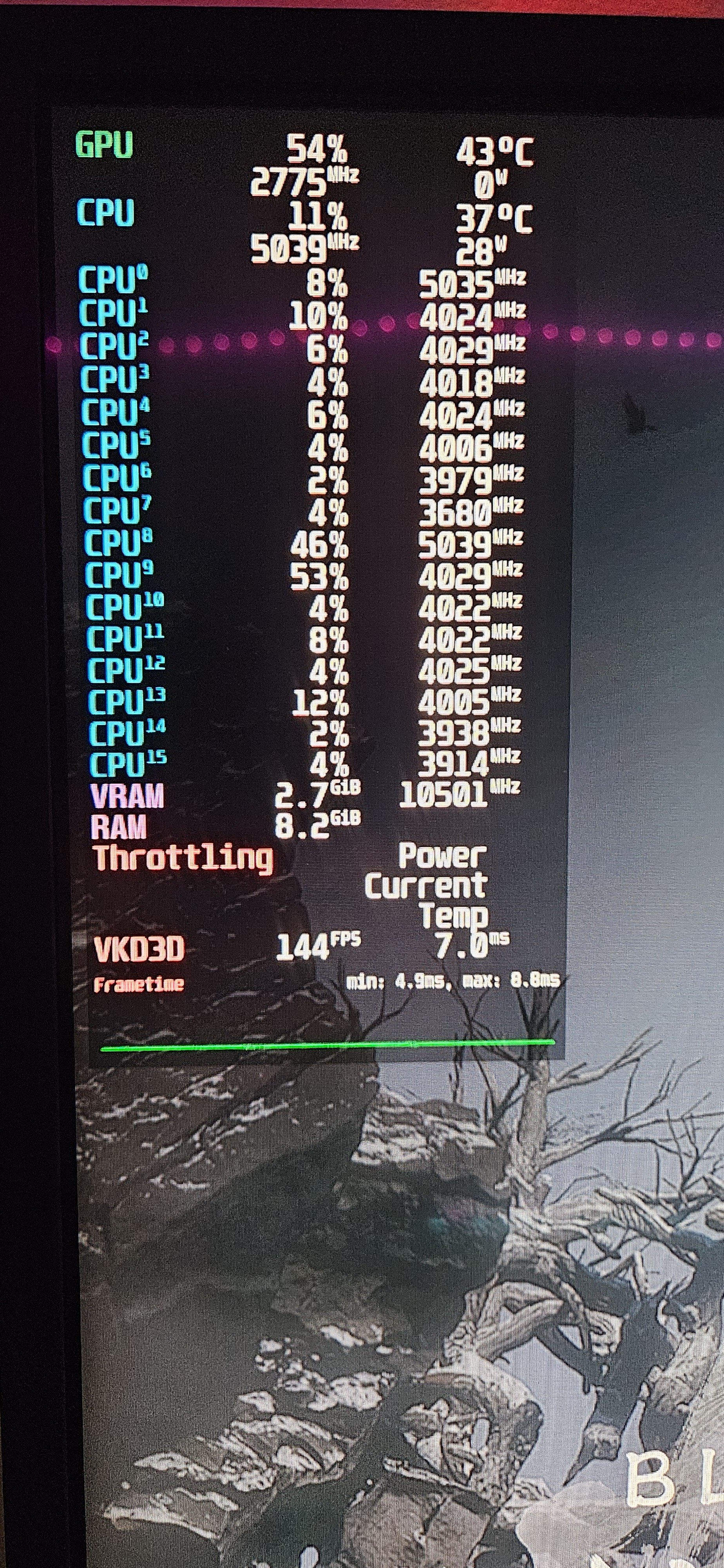
What I don’t understand is how I could be throttling on temps. I’ve been watching them and the temps don’t go above 60c for either GPU or CPU. And the other thing is, it will say I’m throttling as soon as the game loads when the temps are in the 50s. I have also been using a different program to track temps and the most I’ve seen CPU temps is 79c from loading shaders.
Edit: looking at the config file for mango hud, it says : display GPU throttling status based on power, current, temp or “other”. It seems to me that, this popup appears if you have any 1 of those conditions.
Yes, I disable vsync for testing. I haven’t looked up too many benchmarks. I’ve been just watching the core clocks, temps and overall fps stability to determine if the performance is as it should be. I came across a reddit post saying that throttling in mangohud means that you’re using the most out of the PC parts and that’s what you want. So I’m going to not worry about it lol
Nvtop showed everything normal. The GPU power was below the TDP.
I don’t think so. I booted up a 2d side scroller game with the GPU usage at 40% and CPU at 9% and it still says I’m throttling just sitting at the main menu. I did put GPU power in mangohud but it always shows 0 watts.
Grayjay is still working for me